Driver: Driving & Dash Cam App
- 4.5
- Rating
- 100.00K
- Installs
- Free
- Price
 Analysis by App-foxy
Some driving apps try to do everything at once: navigation, traffic alerts, route planning, and vehicle tools. Driver takes a narrower, more practical direction. Its central idea is to let you capture and share your trips, turning a drive into something you can review or show to someone else later. After spending time with it, I see the appeal immediately, especially for people who want a simple record of the road rather than another crowded navigation dashboard.
That focus also defines the experience. This is a free app in the Maps & Navigation category, developed by TryDriver, and it is suitable for Everyone. It has been available since March 29, 2017, works on devices running OS 10 or newer, and has reached over 100 thousand installs. Its average score sits at 4.5 from around 4.8 thousand ratings, with roughly 289 written reviews. Those figures suggest a healthy level of interest, but the real question is whether recording and sharing a journey is useful enough to justify adding another app to your phone.
Why trip capture is the feature that matters
The most important thing about Driver is not simply that it belongs to navigation. It is that the journey itself becomes the object you can preserve. Instead of treating a drive as a route that disappears when you arrive, the app gives that trip a lasting form that can be shared afterward. That changes the way I think about it: Driver is less of a replacement for a full navigation service and more of a companion for documenting movement.
You May Also Like

 Blood Strike: 2.5 Anniversary
Blood Strike’s Loadouts Turn Every Drop Into a Tactical Gamble
A close look at Blood Strike’s custom loadouts: how fast access to signature weapons reshapes its battle royale rhythm, rewards preparation, and narrows the gap between fights.

 Pandora - Music & Podcasts
Pandora’s Music Is Easy to Start, but Harder to Recover
Pandora’s strength is its low-effort path from a seed to a station. Its weak spot is how much confidence it asks you to place in connection, setup, and quiet recovery.

 8 Ball Pool
 Is Built on Rivalries, Rematches, and Routine
A close look at the rivalries, rematches, shared routines, and unanswered safety questions that turn a quick pool match into a persistent mobile community.

 Samsung Music
’s Quiet Strength Is Playing What You Already Own
Its reach comes less from spectacle than from dependable access to a personal library. That simplicity is both the app’s strongest retention engine and its ceiling.

 AccuWeather: Weather Radar
AccuWeather Review: A Quick, Clear Forecast for Everyday Decisions
For everyday plans, the best forecast is the one you can understand quickly. AccuWeather makes rain timing, radar, and local conditions easy to act on, with a few trade-offs.

 Hill Climb Racing
Why Hill Climb Racing Still Turns Crashes Into One More Run
A tiny car, a bumpy hill and one more upgrade: Hill Climb Racing keeps resurfacing because its simple chaos makes every near-miss feel personal.
More From Our News Desk



This distinction matters because conventional map apps are designed around getting you from one place to another. Their success is measured by directions, traffic information, and arrival estimates. Driver serves a different purpose. If I am showing someone a scenic drive, keeping a record of a road trip, or sharing the experience of a journey with people who were not there, a standard map application feels oddly incomplete. It can tell me where I went, but it is not necessarily built around sharing the trip as an experience.
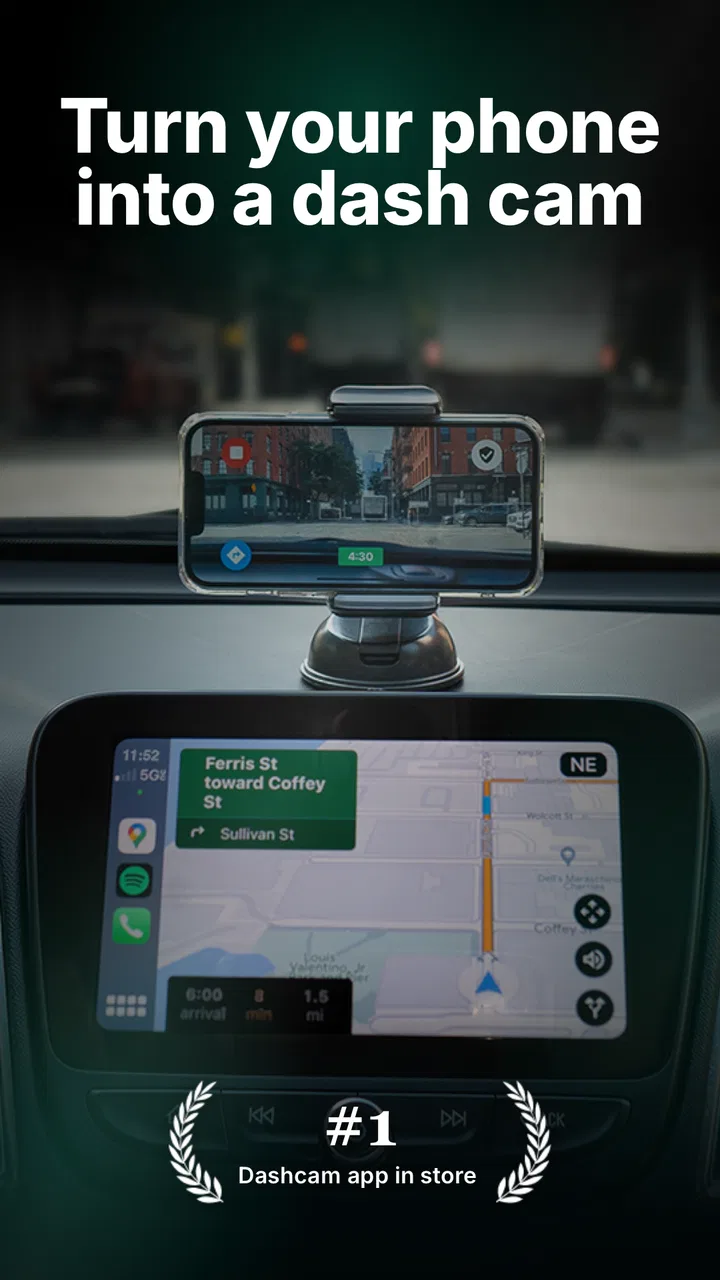
The capability is also useful for drivers who want a visual account of what happened on the road. A recording can provide context that a simple route line cannot. It may help someone remember the sequence of a journey, explain a particular stretch of road, or revisit a drive later with more detail. I would not treat it as an automatic substitute for a dedicated vehicle camera, but I can see why a phone-based tool is attractive: it is already with you, quick to start, and easier to use casually.
One subtle strength is the difference between sharing a destination and sharing a journey. Sending a location tells another person where you ended up. Sharing a trip communicates the path and the experience of getting there. That makes Driver more interesting for family outings, travel memories, driving lessons, and situations where the route itself is worth discussing.
A practical way to think about the workflow
I found it helpful to divide the app’s role into three moments: before driving, during the journey, and after arriving. Before setting off, I would decide whether the trip is worth recording and make sure the phone is positioned safely. During the drive, the app’s value depends on staying out of the way. Afterward, the important step is deciding whether the recording is for personal reference or something to share.
That last decision is more important than it sounds. Not every drive deserves to be saved or sent to someone. A short commute may create clutter without adding much value, while a long scenic route could be exactly the kind of trip you will want to revisit. I recommend treating recordings selectively rather than turning every journey into an archive. This keeps the app useful and avoids making the sharing feature feel like a chore.
There is also a safety consideration that should shape the entire experience. I would prepare the phone before moving, use a stable position, and avoid touching the screen while driving. Driver can support documenting a trip, but it should never encourage interaction behind the wheel. The best use is largely hands-off once the journey begins, with setup and sharing handled while parked.
For someone considering it as a dash-cam-style tool, expectations need to stay realistic. A phone recording can be convenient, but the quality and reliability of any mobile capture experience depend on the device, its placement, available storage, battery condition, and the environment inside the car. Those are not reasons to dismiss Driver; they are reasons to use it deliberately rather than assuming that installing the app alone creates a complete vehicle-recording system.
What sharing changes in everyday use
The sharing angle makes Driver more useful in social situations than a private recording tool would be. Imagine taking a weekend drive with a friend who could not join. Instead of describing the route afterward, you can give that person a way to experience the trip through what you captured. The value is not only evidence of where you were; it is the ability to communicate the shape of the journey.
A second example is a family member waiting for someone on a long drive. A shared trip can make the journey easier to follow than a single message saying, “I am on my way.” It can also be useful when several people are coordinating a drive and want a record to refer back to later. I would still use a conventional location-sharing or navigation tool when live arrival information is the priority, but Driver becomes appealing when the completed journey matters as much as the destination.
There is a creative use as well. Scenic roads, unusual routes, and memorable city drives often disappear into the camera roll as disconnected clips. A trip-focused app gives those moments a more coherent context. The route becomes part of the memory, not just the images captured along the way. For travel-minded users, that is a meaningful difference from keeping random videos in a general gallery.
My advice is to share with a clear purpose. A recording is more valuable when the recipient understands why it was sent: a route suggestion, a memorable drive, a visual explanation, or a record of a shared outing. Without that context, the feature can become another stream of media that people do not open.
The best scenario for Driver
The strongest scenario is a planned drive that has some story attached to it. Think of a coastal route, a mountain road, a visit to several places in one day, or a family trip where the journey is part of the event. In that situation, I would start the app before leaving, secure the phone, and let it document the drive without making the recording itself the focus of attention.
After parking, I would review what is worth keeping and share it with the people who would genuinely appreciate it. This workflow takes advantage of Driver’s main capability without asking it to compete with a full navigation platform. Directions can come from the tool I already trust for navigation, while Driver handles the separate job of preserving the trip.
Another good scenario is explaining a route to someone who will drive it later. Written instructions often leave out the feel of a road: where a turn appears, how the route unfolds, or which sections are especially notable. A captured journey can make that explanation more concrete. It is not a replacement for official directions, but it can complement them by showing the route as a real driving experience.
I would be more cautious about using it for routine commuting. Recording the same trip every day may consume attention and storage without providing much new information. The app is at its best when the journey has practical, personal, or visual value. That selectivity is not a weakness; it is the key to preventing the feature from becoming background noise.
Where the trade-offs become noticeable
The first trade-off is focus. Driver’s trip-capture concept is appealing precisely because it is not trying to be a complete replacement for every map and driving tool. However, users expecting advanced navigation, live traffic intelligence, detailed route alternatives, or a broad travel-planning suite may find the experience too limited for their main driving needs. I would pair it with a conventional navigation app rather than uninstalling one.
The second trade-off is the phone itself. A device mounted in a car has to balance visibility, stability, charging, and heat. Long recordings can be demanding, and a phone that is already low on battery is not a good candidate for a lengthy trip. I would start with a charged device, connect power when appropriate, and check the phone’s position before moving. These are practical habits, but they strongly affect whether the app feels dependable.
Storage is another point worth considering. Captured journeys are larger and more useful than a simple text route, but that also means they should be managed. I would avoid recording every short errand and periodically remove trips that no longer have a purpose. The best archive is not the biggest one; it is the one you can still navigate and understand later.
There is also a difference between casual sharing and formal documentation. If someone needs a purpose-built professional recording setup, a dedicated dash camera may offer a better fit because it is designed around continuous vehicle use. Driver is more attractive when convenience matters and the phone is already available. It gives ordinary drivers a straightforward way to capture a journey, but I would not choose it solely on the assumption that a phone app can cover every need of a specialized camera system.
The app is free to download, which makes trying the basic experience relatively approachable. It does include optional in-app purchases ranging from $0.99 to $94.99 per item, so I would pay attention to any purchase screen and decide in advance what level of use is worthwhile. The wide range means different optional items may serve different needs, but I would not spend simply because the feature is available. For occasional trip sharing, the free starting point may be enough; frequent users should evaluate the value of any paid addition against how often they actually record and share.
Who will gain the most from it
Driver is a good match for people who see driving as part of an experience rather than merely a way to reach an address. Road-trip enthusiasts, travelers, families, driving instructors, and anyone who enjoys documenting routes can get more from it than someone who only wants turn-by-turn directions. It is also useful for people who often need to explain where they went, not just where they are.
I especially like the idea for occasional users. You do not need to build a complicated routine around it. Install it, prepare it for a meaningful trip, record responsibly, and share the result afterward. That low-pressure approach makes the app easier to recommend to a friend who wants something more personal than a map screenshot but less involved than assembling a travel video manually.
People who should skip it are those looking for a single all-in-one driving solution. If your priority is the fastest route, live traffic changes, public transport planning, or a detailed navigation ecosystem, a mature maps application will likely remain the better primary tool. Driver can sit beside that kind of app, but it does not need to replace it to be useful.
I would also hesitate to recommend it to anyone unwilling to manage phone placement, battery use, and recordings. The app cannot remove those physical realities. Its convenience comes from using a phone, and that convenience brings the limitations of using a phone in a moving vehicle.
My final take after using the concept
What I appreciate most about Driver is its clarity. It takes one idea—capturing and sharing a trip—and makes that the reason to open it. That is more compelling than a vague promise to help with driving because I can immediately identify when I would use it: a memorable route, a shared outing, a journey worth explaining, or a drive I want to revisit.
Its best quality is not that it replaces familiar navigation tools. It is that it adds a layer those tools often leave out: the journey as something personal and shareable. The limitations are equally clear. It requires sensible preparation, it should not be treated as a universal dash-camera solution, and it may be unnecessary for ordinary commutes or users who only need directions.
With an average rating of 4.5 and more than 100 thousand installs, Driver has found an audience for that focused approach. My recommendation is straightforward: try it if you want to preserve and communicate the experience of a drive, especially when the route itself matters. If all you need is an arrival time and spoken directions, choose a conventional navigation app instead. For the right kind of trip, though, Driver turns a routine recording into a useful shared memory.
FAQs for Driver: Driving & Dash Cam App
01What is Driver: Driving & Dash Cam App used for?
Driver: Driving & Dash Cam App is designed to help motorists record their journeys while also offering useful driving-related tools. Depending on the available features and device permissions, it may capture road footage, save trip information, and provide convenient access to recordings after a drive. It can be useful for documenting incidents, reviewing routes, or keeping visual evidence of what happened on the road.
02Does Driver: Driving & Dash Cam App work in the background while I drive?
The app may support background recording, but its behavior depends on your phone model, operating-system settings, battery restrictions, and the permissions you grant. Before driving, users should check that camera, microphone, storage, location, and notification access are enabled when required. It is also important to start recording before moving and avoid interacting with the phone while driving.
03Where are recordings saved, and can I share them?
Recorded videos are generally stored on the device or in the app’s designated media folder, depending on the version and your selected settings. Storage requirements can become significant when recording in high quality for long periods, so reviewing and deleting unnecessary clips is recommended. If sharing tools are provided, you can usually export important footage to your gallery or send it through another app.
04Does Driver: Driving & Dash Cam App replace a dedicated dash camera?
A smartphone dash-cam app can be a practical and affordable alternative, but it may not provide all the advantages of dedicated hardware. A phone can overheat, run out of battery, receive notifications, or stop recording because of system limitations. For dependable use, mount the device securely, connect it to a suitable car charger, keep the lens clear, and verify that recordings are actually being saved.
05Is Driver: Driving & Dash Cam App free to use and safe for privacy?
The app’s pricing model may include free features, optional purchases, advertising, or subscription-based tools, so checking the current store listing is recommended before downloading. Privacy also deserves attention because dash-cam apps can request access to the camera, microphone, location, files, and possibly driving data. Review the permission prompts and privacy policy, and disable access that is not necessary for your intended use.
Pros
- Records driving routes with video and GPS data in one place.
- Useful for reviewing incidents after a collision or traffic dispute.
- Can help monitor driving habits during regular trips.
- Provides a practical alternative to carrying a separate dash cam.
- Convenient for users who already keep their smartphone mounted in the car.
Cons
- Continuous recording can consume considerable phone storage space.
- Long trips may drain the battery without a car charger.
- Phone overheating is possible during extended video recording.
- Video quality depends heavily on the device’s camera and mount position.
- Using the app while driving may create distractions if not configured beforehand.

Driver: Driving & Dash Cam App
Gallery